
Onboarding with options
One configuration, one POST request and it's done
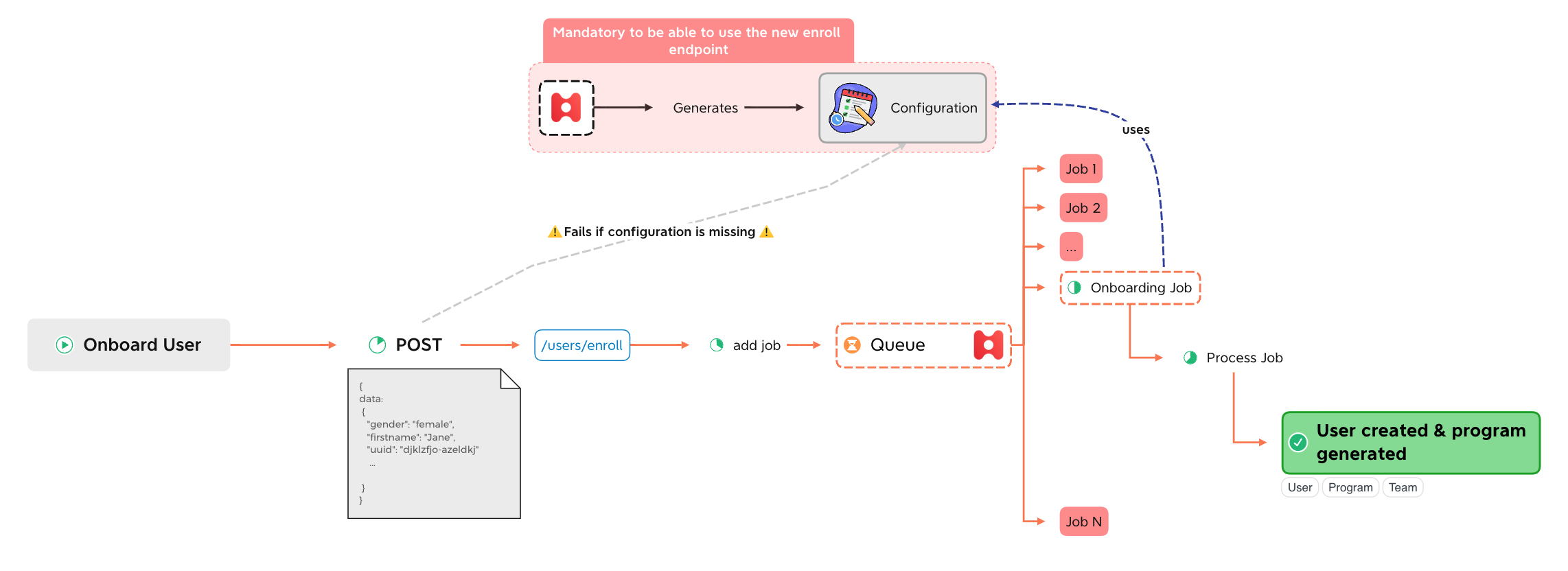
Onboarding with configuration
When is comes to onboarding, HeyTeam is providing another way to simplify drastically the workflow with the API. This is done thanks to a special configuration that HeyTeam will build for you to store the different onboarding options .
Here are the step you need to follow to be able to use this feature.
1. Define the options
To be able to use this feature, you need to contact HeyTeam for the team to define what options are the most suitable to you and to create it. See here for more detail on the options available.
How to define options ?Most of the time, HeyTeam will ask you to send a json example of the data you wish to use for the onboarding. HeyTeam will then take care of the mapping and other setup that will define how to retrieve the entities for example and to define if the onboarding can start right away (all the mandatory data are needed in the json ikn this case).
Once the configuration is finalized with HeyTeam, you can make your first POST request.
2. making a POST request
To onboard a user, you need to make a POST request on /users/enroll like the following example :
curl --request POST \
     --url https://[your-domain].heyteam.com/eapi/users/enroll \
     --header 'accept: application/json' \
      --header 'authorization: Bearer your-token' \
     --header 'content-type: application/json' \
     --data '
{
  "data": {
  	"uuid": "YourUserUUID",
    "userName": "John",
    "familyName": "Doe",
    "email": "[email protected]",
    "manager": {
    	"email": "[email protected]",
      ...
    },
    ...
  }
}
'
You will receive a response with a 202 code status indicating that your request has been accepted and the onboarding has been queued.
424 ERRORYou will receive this error if you try to make a POST request without any configuration available.
Job status
Once the onboarding has been queued, you can search for the job status by making a GET request on /queuing/jobs. It is possible to search a string in the payload you sent to create the job.
Exemple when searching for 'janeUUID' :
curl --request GET \
     --url 'https://[your-domain].heyteam.com/eapi/queuing/jobs?search=janeUUID' \
     --header 'accept: application/json'\
     --header 'authorization: Bearer your-token'
You can also retrieve the jobs by status. Example with 'success' status :
curl --request GET \
     --url 'https:///\[your-domain\].heyteam.com/eapi/queuing/jobs?status=success' \
     --header 'accept: application/json' \
     --header 'authorization: Bearer your-token'
Updated 12 months ago